

How to Apply for Projects
Learn how to apply for projects, increase your chances of being selected, and start working with businesses on Makeity.
How to Apply for Projects on Makeity
Makeity allows approved creators to discover projects that match their country, language, experience and content style.
When you find a suitable opportunity, you can submit a proposal directly from the Makeity app. The business will review the applications and select the creator who best matches the project.
- Browse projects available to you
- Review the full project details
- Confirm that you meet the requirements
- Submit a clear and professional proposal
- Wait for the business to review your application
Open the Suggestions Area
Log in to the Makeity app and open the Suggestions section from the navigation menu.
This area displays projects that may match the information saved in your creator profile.
Browse Available Projects
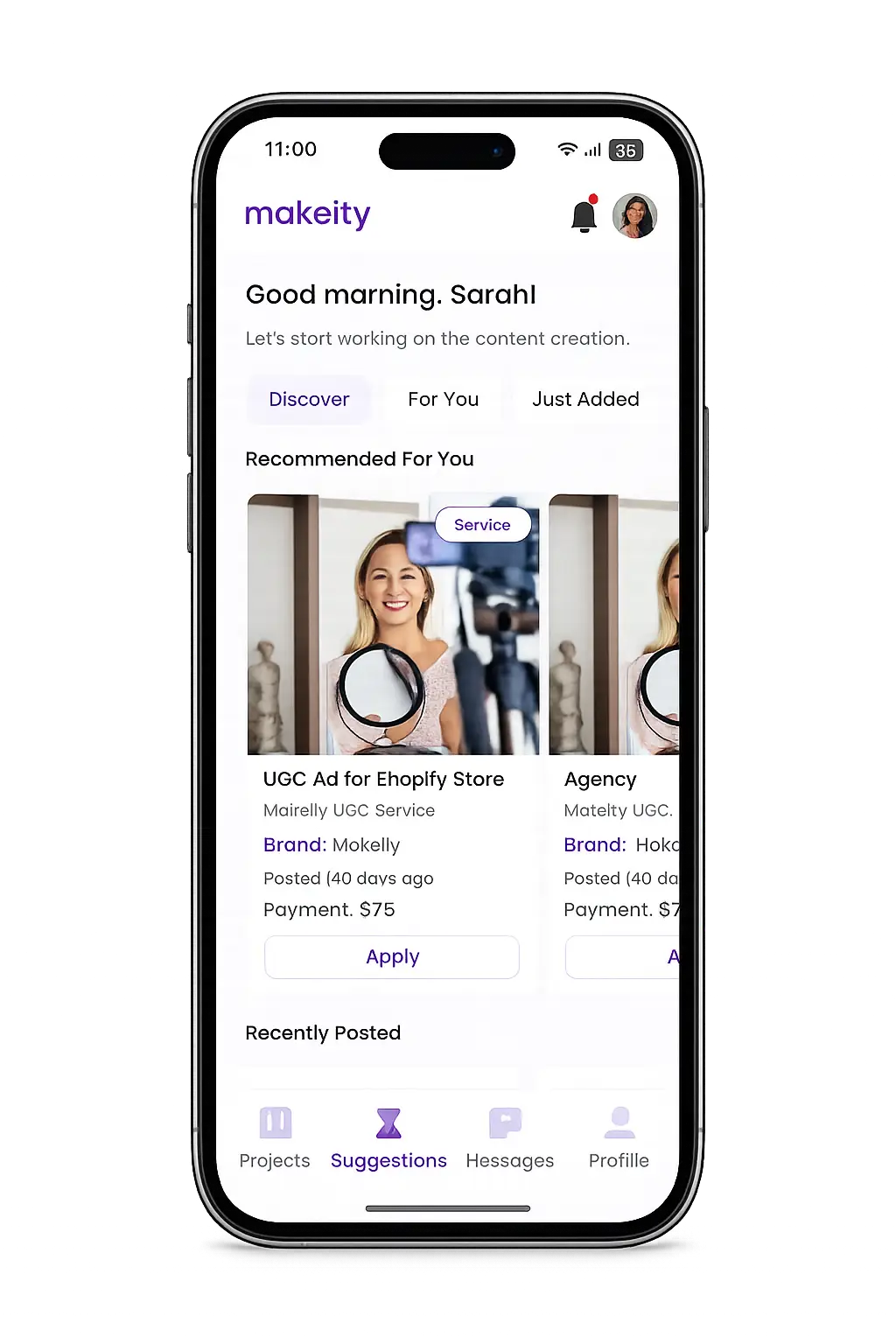
Review the projects displayed in the Discover, For You and Just Added sections.
Each project card may show information such as:
- The business or brand
- The project type
- The creator payment
- Whether the project is physical, digital or service-based
- The date the project was published
- The required country or language
Open the Project Details
Select a project to review the complete requirements before applying. Do not apply based only on the image or payment displayed on the project card.
Carefully check:
- The product, service or app being promoted
- The requested video length and format
- The content style and project brief
- The required language
- The target audience
- The expected delivery timeline
- Whether a physical product must be shipped to you
- The creator payment and included deliverables
Confirm That the Project Is a Good Match
Apply only when you are confident that you can complete the project professionally and within the required timeline.
Before applying, ask yourself:
- Can I create content in the required language?
- Does this project match my content style or experience?
- Can I follow all points in the brief?
- Can I complete the project before the deadline?
- Am I comfortable promoting this product or service?
- Is my shipping address correct if a product will be sent?
Submit Your Proposal
Click the application button and introduce yourself to the business. Your proposal should be short, relevant and specific to the project.
A strong proposal should explain:
- Why you are interested in the project
- Why your style or experience is a good fit
- How you plan to approach the content
- Any relevant experience you have in the project category
- That you reviewed and understood the requirements
Proposal example
Review and Send Your Application
Before submitting, read your proposal one more time and make sure it is clear, professional and relevant to the project.
- Check spelling and grammar
- Avoid copying the same proposal for every project
- Do not include personal contact information
- Do not ask the business to communicate outside Makeity
- Do not promise deliverables that are not included in the order
When everything is ready, submit your proposal through the Makeity app.
Wait for the Business Decision
After your proposal is submitted, the business can review your creator profile, sample videos, rating and proposal.
The business may select you, choose another creator or leave the project open while reviewing additional applications.
What Happens If You Are Selected?
If the business selects you, you will receive a notification inside Makeity.
You will then be able to:
- Open the order details
- Review the final requirements
- Accept or decline the order
- Communicate with the business through Makeity
- Receive shipping information or project materials
- Begin the content creation process
What Happens If You Are Not Selected?
Not being selected does not negatively affect your creator account. Businesses may receive several strong applications and can select only the creator who best matches that specific project.
Continue applying to suitable opportunities and keep your creator profile, portfolio and sample videos up to date.
Tips to Improve Your Chances of Being Selected
- Apply only to projects that genuinely match your profile
- Submit your proposal early when possible
- Write a proposal specifically for each project
- Keep your sample videos current and high quality
- Use a clear creator profile photo and cover image
- Complete all profile and shipping information
- Maintain a strong delivery record and creator rating
- Show the business that you carefully reviewed the brief
- Keep your proposal concise, friendly and professional
⚠️ Important
Do not send your phone number, email address, social media contact details or external payment information inside a proposal. All project communication and payments must remain inside Makeity.
Frequently Asked Questions
Who can apply for projects?
Creators with an active Makeity account can apply for projects available in their country or shown in their Suggestions area. Some projects may have additional language, age, experience or profile requirements.
Does applying guarantee that I will receive the order?
No. Applying sends your proposal to the business for review. The business decides which creator is the best match for the project.
Can I apply to more than one project?
Yes. You may apply to multiple suitable projects, provided you are able to complete any orders you accept within their required timelines.
Can I edit my proposal after submitting it?
In most cases, submitted proposals cannot be edited. Review your message carefully before sending it.
Why do I not see many projects?
Project availability depends on your country, language, creator profile and current business demand. Keep your profile complete and check the app regularly for newly published opportunities.
How will I know if I am selected?
You will receive a notification inside Makeity, and the project will appear in your orders area with instructions to review and accept it.
Should I contact the business outside Makeity?
No. All communication related to a Makeity project should remain inside the platform for your protection and proper order documentation.
Create From Anywhere
Manage your creator account from the Makeity app
Discover new projects, communicate with businesses, upload content, track your orders and manage everything directly from your phone.


Still need help with your account or project?
Contact the Makeity support team and include your account email, order number and a clear explanation of the issue.

Helping brands create authentic content through trusted creators worldwide.
Makeity connects businesses with content creators around the world for authentic, high-quality user-generated content.
Creator Support
Makeity
Legal
© 2026 Makeity®. All rights reserved.
We use cookies to ensure the platform works properly, analyze usage, and improve your experience. You’re always in control — accept, reject non-essential cookies, or manage your preferences.